
Do you hate it when the power flickers during a storm and your internet restarts?
Sometimes the lights only blink for one second, but that is still enough to make your internet gateway, modem, router, or Wi-Fi box shut off and start over. Even worse, storms can cause several quick flickers in a row. That can leave your internet box power cycling again and again.
The good news is that there is a simple and low-cost way to help prevent this.
You do not need a large and bulky computer battery backup sitting on the floor gathering dust. For many homes, a small device called a Mini UPS may be enough.
This is not a paid promotion or advertisement. This is just a helpful idea for neighbors who want to keep their internet working during short power flickers.
What Is a Mini UPS?
UPS stands for uninterruptible power supply.
A Mini UPS is a small battery backup made for low-power devices. It is often used for things like:
- Internet modems
- Home Wi-Fi routers
- Fiber gateways
- Security hubs
- Small cameras
- Voice assistants
- Streaming devices
- Roku devices
- Other USB-powered devices
A Mini UPS is different from the large battery backup units people often use for computers. A large UPS usually has regular power outlets (for AC Power), while A Mini UPS usually powers small DC devices with a round barrel plug or USB cable. Since it doesn’t have to convert AC to a DC Battery and back to AC for your device, it is significantly smaller.
That makes it a good fit for many home internet boxes!
Why Would You Want One?
Many homes in our area have internet service from providers such as OzarksGo, AT&T, Cox, or other providers. These services often use a gateway, modem, router, or fiber box that plugs into the wall.
When the power flickers, that box turns off. Then it has to restart. That can take several minutes.
A Mini UPS can keep that device powered during short outages or quick flickers. So when the lights blink, your internet box may keep running.
That means you may be able to keep browsing, streaming, or using your phone on Wi-Fi while the power is flickering.
What We Use
For this type of need, we use the Shanqiu Mini UPS Battery Backup (Amazon Quick Link: https://a.co/d/01KMsbC6, or search on the web for “Shanqiu Mini UPS 74Wh” to see if your favorite store carries it). Picture Below:
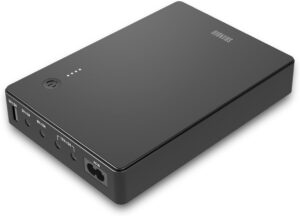
It is a small backup power unit that can support many common DC-powered devices. The version we use supports up to 12 volts at 5 amps, with a maximum output of 60 watts.
It also has USB output, which can be useful for some small USB-powered devices.
Prices change often, but this type of unit is usually much less expensive than a large floor-style computer UPS. On Amazon, it is often around $69 to $80, depending on the month and any sale. Additionally, these types of devices use Lithium Ion batteries, so unlike large UPS devices, they will last 10 years without requiring a battery replacement every 3 years.
Before You Buy One
Before buying a Mini UPS, check your device first (that will plug into the Mini UPS). Do not guess.
Look at the label on the back or bottom of your modem, router, or gateway. You are looking for three things.
1. Check the Voltage
Most home internet boxes use 12V power, but not all of them do.
The label may say something like:
12V
12V DC
Input: 12V (or on the power supply Output: 12V)
The Mini UPS output must match the voltage your device needs.
If your device says 12V, use the 12V output.
If your device says 9V, use the 9V output.
If your device says 5V, use the 5V output or USB if allowed.
Do not plug a device into the wrong voltage output.
2. Check the Amps or Watts
The next thing to check is how much power the device uses.
The label may show amps, such as:
12V 2A
12V 3A
12V 4A
For the Shanqiu Mini UPS we use, the 12V outputs share up to 5 amps total. That means your device, or all devices together, should stay under that limit.
Sometimes the label shows watts instead of amps.
To convert watts to amps, divide watts by volts.
For example:
- 60 watts divided by 12 volts equals 5 amps.
- So a 12V device that uses 60 watts would use 5 amps.
A simple formula is: Watts divided by Volts equals Amps.
3. Check the Plug Type
Many modems and routers use a round barrel-style DC plug. This is the common round plug that goes into the back of the device.
Before buying a Mini UPS, make sure your device uses this type of plug.
Some devices use special plugs. Some may use USB-C. Some may need a power adapter that cannot be replaced by a Mini UPS.
If the plug does not match, do not force it, instead check for a converter cable online for your device to convert a standard DC barrel to your plug type.
Pro Tip: If you don’t know what your plug type is called, use Google Lens on your phone to take a picture of it and search to determine what it is called, or upload your image to Chat GPT and ask it “what kind of connector is this?”
How to Set It Up
Setup is usually simple.
- First, plug the Mini UPS into the wall.
- Then connect your modem, router, gateway, Roku, security hub, or other small device to the correct output on the Mini UPS.
- Make sure you use the correct voltage output. If your modem needs 12V, connect it to the 12V output.
- Once connected, the Mini UPS stays plugged into the wall and keeps itself charged. Your device runs through the Mini UPS.
- You may need to initially turn on the Mini UPS via the power button.
- When the power flickers, the Mini UPS battery keeps the device running. You can verify that everything works by unplugging the Mini UPS from the wall and making sure that your device stays on.
That is it!
Good Uses Around the House
A Mini UPS can be useful for more than just your internet box.
You may also use one for:
- A security hub
- A smart home hub
- A voice assistant
- A small camera
- A Roku or streaming stick
- A small network switch
- A Wi-Fi router
- A fiber gateway
This can help keep important small devices from shutting off every time the power blinks.
A Simple Storm Example
Imagine you are watching a show and a storm rolls through.
The lights flicker once. Then they flicker again. Then they flicker one more time.
Without battery backup, your internet box may restart each time. Your show stops. Your Wi-Fi drops. Your devices may take several minutes to reconnect.
With a Mini UPS, your internet box may keep running through those quick flickers.
You may still be sitting in the dark, but at least your internet and streaming device may stay on until the power comes back steady.
Safety Tips
Please use common sense and check your equipment first.
- Match the voltage exactly.
- Do not exceed the amp limit.
- Do not exceed the watt limit.
- Use the correct plug.
- Do not force a cable into a device.
- Do not use it outdoors unless the product says it is made for outdoor use.
- Do not cover the unit or place it where it can overheat.
- Do not use it for large appliances.
- Do not use it for medical devices.
- Do not plug in anything you are unsure about.
If you are not sure what your modem or router needs, take a photo of the power label and ask someone who understands basic electronics.
Final Thought
A Mini UPS is a simple and useful tool for many homes. It can help keep your internet, router, security hub, or other small device running when the power flickers.
It is not a whole-home generator. It will not run large appliances. It will not keep everything on during a long outage.
But for quick flickers and short outages, it can be a great little fix.
Never miss a minute of your favorite show again just because the lights blinked.